Technological Overthinking #2: Bluesky posts as status on Bear Blog
🌐 This blog entry is part of a series called Technological Overthinking
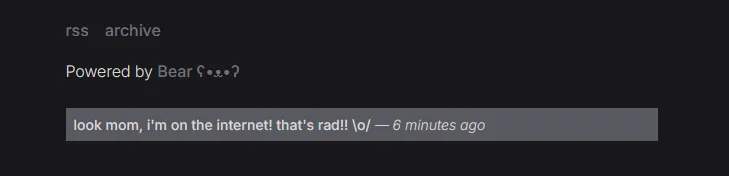
Some time ago I met Dame's work looking for AT Proto blogging platforms and thinking about making my own. I eventually dropped the idea and settled with Bear Blog, but there was one little thing in their website that caught my attention: they have a small bar on top to put small status updates. This in itself it's not something new— many people use status.cafe or status.lol, for example, but it had one little particularity: Those statuses were actually AT Proto records with their own lexicon.
Long story short, they wrote in this post their motivations and shared a small iOS shortcut to post to an AT Proto account (like any Bluesky account, for our less nerdy readers) right from it. I, for example, have a quick access button to the shortcut in my notification screen, so if I have any quick thought I want to share, I don't need to enter an app I intentionally left some weeks ago. I'm also posting on a different account than my main one so my followers don't get spammed with my brainfarts— it's after all something I only care to show on my webpage and blog.
Loading AT Proto records in Javascript
Now it comes the part where we want to retrieve those records (posts) and show the last one. If you're interested I already made a Javascript snippet you can put in your header directives here on Bear Blog, but I'll explain what are we doing step by step:
<script>
  // Function to format a text more precisely according to the time that has passed since the record was created
  function timeAgo(input) {
    const date = (input instanceof Date) ? input : new Date(input);
    const formatter = new Intl.RelativeTimeFormat('en');
    const ranges = {
      years: 3600 * 24 * 365,
      months: 3600 * 24 * 30,
      weeks: 3600 * 24 * 7,
      days: 3600 * 24,
      hours: 3600,
      minutes: 60,
      seconds: 1
    };
    const secondsElapsed = (date.getTime() - Date.now()) / 1000;
    for (let key in ranges) {
      if (ranges[key] < Math.abs(secondsElapsed)) {
        const delta = secondsElapsed / ranges[key];
        return formatter.format(Math.round(delta), key);
      }
    }
  }

  // Initialize when DOM (page) is loaded
  document.addEventListener('DOMContentLoaded', function() {

    // Call Bluesky's public API to retrieve your last post. Remember to put your DID correctly in the URL.
    fetch("https://public.api.bsky.app/xrpc/app.bsky.feed.getAuthorFeed?actor=INSERT_YOUR_DID_HERE&filter=posts_and_author_threads&limit=1")
      .then(response => response.json())
      .then(json => {
        const record = json.feed[0].post.record;

        // Create an html link "<a>" element and set the data accordingly. Remember to put your DID or account handle correctly in the href link.
        const status = document.createElement("a");
        status.id = "status-bar";
        status.href = "https://bsky.app/profile/INSERT_YOUR_DID_OR_HANDLE_HERE";
        status.target = "_blank";
        status.innerText = record.text;

        // Create a second text element to state how long ago it was posted.
        const statusTime = document.createElement("span");
        statusTime.id = "status-time";
        statusTime.innerText = " — " + timeAgo(record.createdAt);
        status.appendChild(statusTime);

        // In my case I wanted my status to show if we're not in the home page and at the end of the body, so this does exactly that.
        if (window.location.pathname !== "/") document.body.appendChild(status);

        // This other line, for example, would put it right after the navigation bar instead.
        //if (window.location.pathname !== "/") document.getElementsByTagName("nav")[0].after(status);
      });
  });
</script>
Put some style
So now it shows, but must look broken as heck. This is why also gave it some styles referencing their ID tag. Feel free to change anything to make it fit into your own stylesheet:
#status-bar {
  display: block;
  width: 100%;
  margin-bottom: 0.75rem;
  padding-block: 0.25rem;
  padding-inline: 0.5rem;
  font-size: 14px;
  font-weight: 500;
  color: var(--text-color);
  background: var(--subaccent-color);

  &:hover {
    text-decoration-color: var(--text-color);
  }
}

#status-time {
  font-weight: 300;
  font-style: italic;
}
And again, if you liked this remember to thank Dame for their work because it's a really cool workflow that otherwise I couldn't have even thought of!